Most Amazon sellers treat a bid as what they are willing to pay for a click.
That is why most sellers overpay, underpay, or guess.
A bid is not a price tag. It is a ceiling. And there is one number that tells you exactly where that ceiling should sit — a number you can work out in about five minutes, from figures you already have.
Every account I have audited that was bleeding ad spend had the same root cause. Not a targeting problem. Not a match type problem. Bids set by feel instead of by math.
Here is the math.
First: a bid is not what you pay
When you set a bid of $1.50, you are not agreeing to pay $1.50 per click. You are telling Amazon the most you are willing to pay to enter the auction for that search term.
- What you actually pay is usually less than your bid.
- Amazon decides it from relevance, conversion history and who else is competing.
- A high bid on an irrelevant product still loses to a lower bid on a product shoppers actually buy.
So your bid is a limit you set. The only real question is: what should that limit be?
The formula
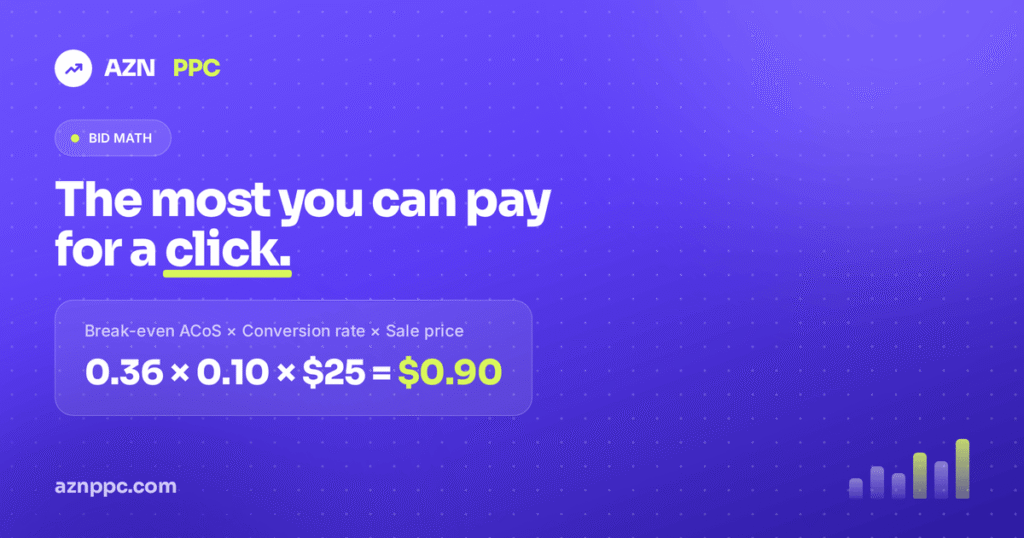
Break-even bid = Break-even ACoS × Conversion rate × Sale price
Three numbers you already have. One number it gives back: the most you can pay for a click on that keyword before the ads stop paying for themselves.
Most people skip straight to plugging numbers in. The first number is where they go wrong, so start there.
Step 1: Work out your real break-even ACoS
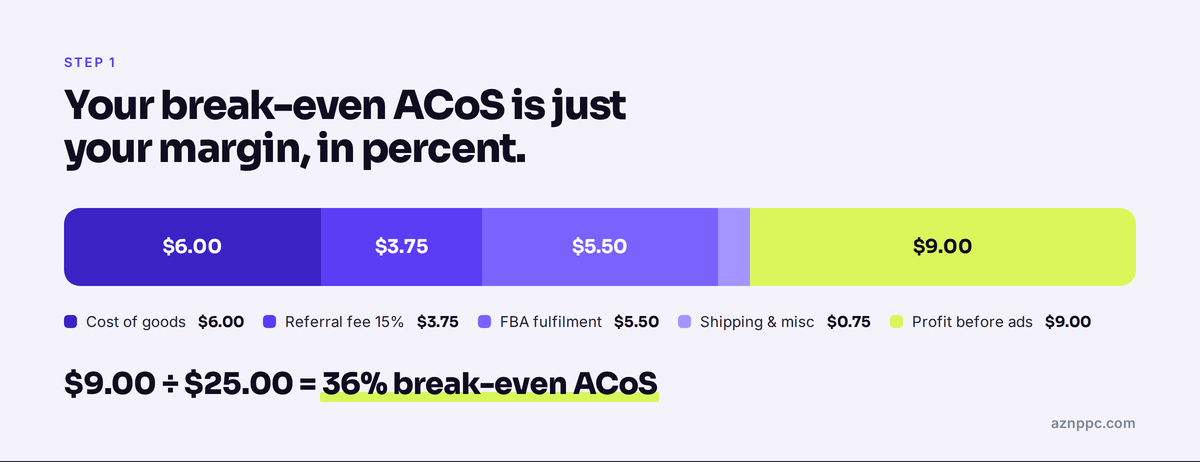
Break-even ACoS is not a number you choose. It is your margin before advertising, expressed as a percentage of your sale price.
Take everything out of the sale price except ad spend. For a $25 product:
| Line item | Amount |
|---|---|
| Sale price | $25.00 |
| Cost of goods | −$6.00 |
| Amazon referral fee (15%) | −$3.75 |
| FBA fulfilment | −$5.50 |
| Inbound shipping and misc | −$0.75 |
| Profit before ads | $9.00 |
$9.00 ÷ $25.00 = 36%.
That is your break-even ACoS. Spend 36% of revenue on ads and you make nothing. Spend more and you are buying sales out of your own pocket.
This is a per-product number, not an account number. A $12 SKU and a $60 SKU in the same brand can sit twenty points apart, and bidding them as though they were the same is how accounts quietly leak money for months.
Step 2: Get the keyword’s real conversion rate
Account-level conversion rate is not good enough here. You need conversion rate at the level you are actually bidding — the keyword or the product target.
- Search Term Report — orders divided by clicks for that specific search term.
- Search Query Performance — purchase rate at query level, if you have Brand Analytics.
- Wait for 30 to 50 clicks before you trust the number.
If a keyword has 8 clicks and 1 order, you do not have a 12.5% conversion rate. You have noise. Use the ad group or product average until that term has earned its own number.
Step 3: Put it together
Product sells for $25. Break-even ACoS is 36%. The keyword converts at 10%.
0.36 × 0.10 × $25 = $0.90
Ninety cents is the most you can pay for a click on that keyword and still break even.
Check it: 10 clicks at $0.90 is $9.00 of spend. At a 10% conversion rate that is 1 order, or $25.00 of revenue. ACoS lands at 36% — exactly break-even.
Bid above $0.90 on this keyword and you are losing money by definition. Not bad luck. Just math.
The part most people get backwards
Ask a seller what to do with a keyword that converts well, and most will say keep the bid low, it is working.
The opposite is true.
- Double the conversion rate and you need half as many clicks per sale.
- So every click on that keyword is worth twice as much to you.
- Same product, same margin, but converting at 20% instead of 10%: 0.36 × 0.20 × $25 = $1.80.
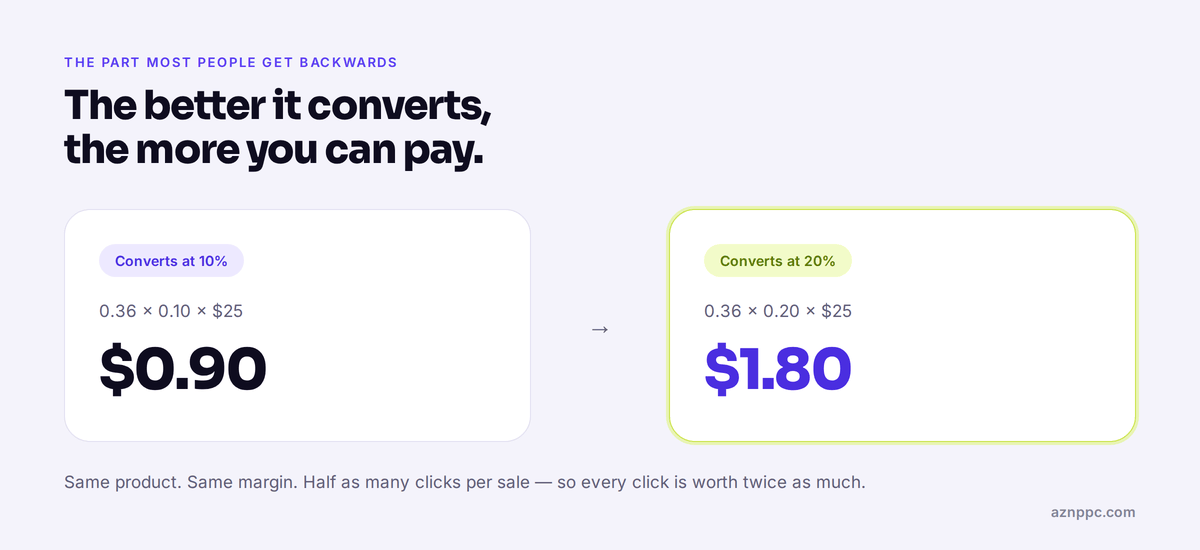
Your best-converting search terms should usually be your most aggressively bid ones, not your most cautious. Most accounts do it the other way round — which is exactly why their best keywords sit in position six while a worse-converting term takes top of search.
Break-even is the ceiling, not the target
The break-even bid tells you where you stop making money. It does not tell you what to bid.
To bid for a target ACoS, swap it into the same formula:
- Target 25% ACoS: 0.25 × 0.10 × $25 = $0.63
- Target 15% ACoS: 0.15 × 0.10 × $25 = $0.38
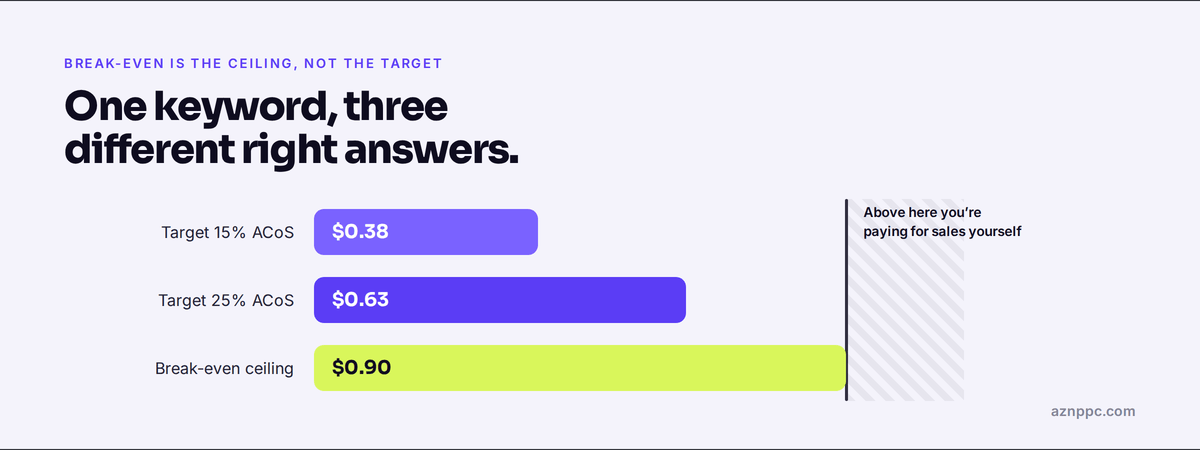
Now you have a range with meaning at both ends: $0.38 if you want the term to be genuinely profitable, $0.90 before it starts costing you. Anything above $0.90 is a choice you are making with your own money — which is fine, as long as you know you are making it.
When bidding above break-even is the right call
There are real reasons to cross the line on purpose:
- Launch. Buying ranking and sales velocity before organic can carry the product.
- Defence. Holding a term you cannot afford to hand to a competitor.
- Repeat purchase. Products where the first order is not the whole value of the customer.
In all three, judge it on TACoS rather than ACoS. If total ad spend as a share of total sales is falling while sales grow, the overspend is doing its job. If TACoS is flat or climbing, it is not — and you are just subsidising clicks.
Three ways this goes wrong in real accounts
Even when sellers know the formula, the same three mistakes turn up again and again.
- One target ACoS for the whole account. Your break-even ACoS is per product. A single account-wide target guarantees you underbid your best margins and overbid your worst.
- Forgetting that price changes move the number. A coupon, a promo or a price drop changes your break-even ACoS, and every bid underneath it. Most accounts run a 20% coupon and never revisit a single bid.
- Placement multipliers blowing past the ceiling. A 100% top-of-search multiplier on a $0.90 bid is a $1.80 bid. The bid was right. The multiplier quietly doubled it.
Where to start
Do not try to reprice a whole account in one sitting.
- Pull your top 20 search terms by spend.
- Work out the break-even bid for each one.
- Flag every term where the current bid sits above it.
That short list is usually where most of the waste is hiding, and it is normally a handful of terms rather than hundreds.
Once your bids come from this number instead of from a feeling, everything downstream gets easier. Placement multipliers, dayparting, when to push and when to pull back — they all become decisions with a reference point, instead of guesses.
Want the rest of the checks?
This is check number two of the twelve I work through before quoting on any account. Get the full 12-point Amazon PPC audit checklist — free, and no pitch attached.